

Looking at campaign numbers without some kind of visual frame… It’s messy. How to Analyze Campaign ROI Using Tableau isn’t about fancy charts; it’s about making sense of all that spend, clicks, and conversions. Pull together data from Ads, emails, and CRM; clean it up, and figure out your ROI, ROAS, CAC, and LTV. Then Tableau lets you actually see which campaigns are paying off, which are lagging, and where to move the budget. Dashboards don’t need to be perfect, just clear enough to spot trends fast. A bit of forecasting can hint at what’s coming next. In the end, it’s about turning numbers into decisions that make sense.
Table of Contents
Introduction:
Understanding Campaign ROI Analysis and Tableau’s Role
Budgets don’t stretch on their own. Every campaign, ad, email, social post, and influencer needs to justify its cost. ROI, at the end of the day, is just a way to check if the money spent is actually doing anything. Sounds obvious, but so many campaigns get launched without anyone actually measuring that properly.
Tableau helps make sense of all this noise. It’s not about pretty charts (though those help), it’s about seeing patterns that matter. Trends, spikes, channels that overperform or underperform; it’s all there if you set it up right. And yes, dashboards can feel intimidating at first, but once they’re humming, they save a ton of headaches.
The goal here isn’t theory. It’s about giving a roadmap you can actually follow;set up a dashboard, pull in your numbers, and see what’s working. No fluff. Just what moves the needle.
What Is Campaign ROI?
Campaign ROI is basically the “return on spend.” Easy to say, trickier to track. It’s not just revenue; sometimes a campaign doesn’t make money immediately but builds leads or engagement that pays off later.
Formula, in the simplest sense:
ROI (%) = (Revenue – Cost) ÷ Cost × 100
But the devil’s in the details. Take a look:
- Paid ads – Google, Meta, LinkedIn. They cost money upfront, and you need to know which ones actually make it back.
- Organic campaigns – blogs, social posts, SEO. Slow burn, but important for long-term ROI.
- Email marketing – nurturing, retention. Sometimes the value shows weeks or months later.
- Influencer or partnership campaigns – messy to track, but a single hit can spike conversions.
Tracking ROI can get messy. UTMs get forgotten, cost data lives in different places, and multi-channel attribution is a headache. Even so, having a handle on ROI, even rough, is better than flying blind. It tells you where to push harder and where to pull back.
Why Use Tableau for Marketing ROI Analysis?
Spreadsheets work, but only up to a point. Tableau lets you actually see the story behind the numbers.
Charts that make sense – line charts for trends, bars for comparing channels, heatmaps for spotting hot spots. The eyes pick up patterns way faster than raw numbers.
Brings everything together – ad platforms, analytics, CRM, spreadsheets. One place to see the full picture.
Interactive dashboards – click, filter, drill down. Want to see last quarter vs this one? Easy.
Live data – dashboards can refresh automatically. No more guessing if the numbers are old.
Readable reporting – managers and clients don’t need spreadsheets. They need clarity, and Tableau gives it.
Basically, it turns messy, scattered data into something actionable. You can finally see what’s working, what’s wasting money, and where to focus. Makes decision-making a lot less guessy.
How to Analyze Campaign ROI Using Tableau
Looking at ROI isn’t always neat. Campaigns overlap, numbers come from different places, and sometimes you wonder if the spreadsheet gods are just messing with you. Tableau can help, but only if you go in with a plan.
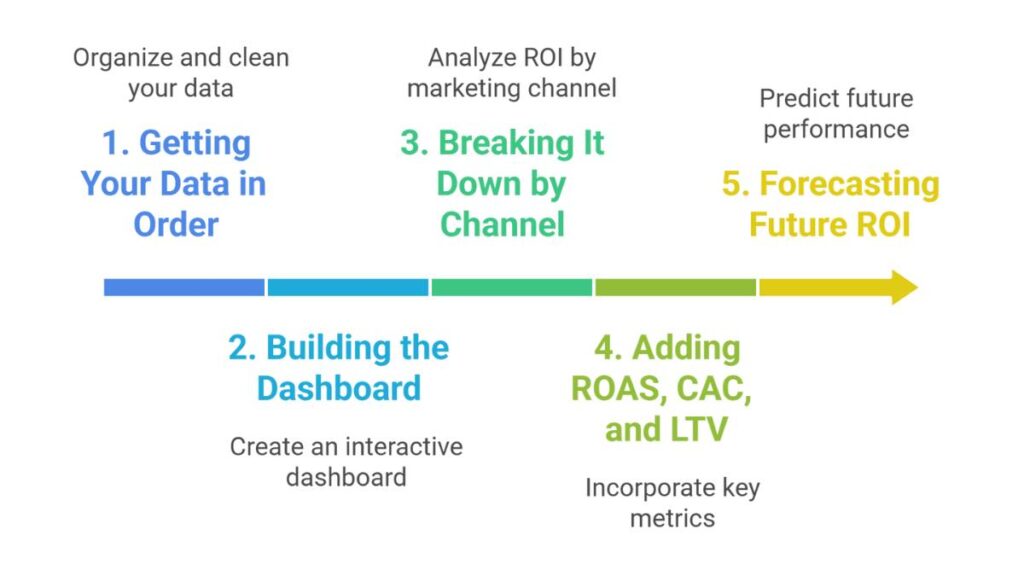
1. Getting Your Data in Order
Before doing anything in Tableau, the first step is making sure your data isn’t a mess.
Pull it all together: Analytics, ad platforms, CRM exports, spreadsheets;whatever has your campaign info. Yes, it’s annoying, but having it all in one place saves pain later.
Check the basics: Dates, UTMs, cost numbers, conversions. Little inconsistencies can completely skew ROI, and you don’t want to realize that three hours before a presentation.
Set up calculated fields: Things like campaign cost, revenue, CAC, and ROI. Once these are in Tableau, you won’t have to do the math by hand every time. It’s a bit of upfront work, but worth it.
Basically, if the data isn’t clean, nothing else matters.
2. Building the Dashboard
Once the data isn’t crying at you, you can start building the dashboard. Think about it like a dashboard in a car; you need to see the speed, fuel, and engine temp, not every wire in the engine.
Pick your story:
Don’t try to show every metric under the sun. Focus on the ones that actually tell you what’s working.
Key metrics:
- Campaign spend
- Revenue
- CPA (cost per acquisition)
- LTV (customer lifetime value)
- ROI %
Charts that make sense:
- Line charts for trends; watch spikes, they tell stories
- Bar charts for comparing channels
- Scatter plots to see cost vs returns
- Heatmaps for multi-channel comparisons
A dashboard doesn’t need to be fancy. Clarity beats sparkle every time.

Apply Now: Advanced Digital Marketing Course
3. Breaking It Down by Channel
Not all channels are created equal. Breaking ROI down by channel is where things start to make sense.
Compare paid search, social, organic, email, referrals, whatever you use.
Filters and segments are your friends. Slice by campaign, audience, or date.
Look for patterns:
- Channels that consistently give high ROI – maybe give them more budget.
- Channels that lag – figure out why or pause them.
Side-by-side visuals make these decisions way easier. You start to see where money actually works.
4. Adding ROAS, CAC, and LTV
ROI is just the tip of the iceberg. Other metrics fill in the gaps.
ROAS (Return on Ad Spend): How much revenue each ad dollar brings in. Essential for paid campaigns.
CAC: Cost to acquire a customer. Track over time to see trends.
LTV: Long-term value. Some campaigns take months to show returns.
Combine them: Layering ROAS, CAC, and LTV gives a fuller picture. You see which campaigns are truly profitable and which only look good at first glance.
Tableau’s calculated fields make this easier, so you’re not recalculating every time new data comes in.
5. Forecasting Future ROI
Once you’ve got historical data, it’s tempting to guess what’s next. Tableau has forecasting tools for that, and while it’s not perfect, it’s better than pure guesswork.
- Look at past trends to forecast ROI.
- Spot efficiency trends; one channel might be improving, another plateauing.
- Use this to guide budgets or scale campaigns.
Forecasts won’t predict everything, but they give context. Even a rough idea is more useful than flying blind.
Bottom line: Tableau won’t do the thinking for you. Clean data, the right metrics, and visuals that actually make sense; that’s how ROI analysis stops being frustrating and starts being actionable.
Also Read: What are Marketing Metrics?
Tableau Best Practices for Accurate Campaign ROI Reporting
Doing ROI right isn’t about making pretty charts. It’s about making sure the numbers actually mean something. Some things that seem small can screw up a whole dashboard if ignored.
UTMs matter; stick to them: If one campaign has “SpringSale2025” and another “spring_sale_25,” Tableau treats them as different. You’ll chase your tail trying to fix it later.
Pull all your data together: Ads, analytics, CRM, spreadsheets… nothing worse than seeing a campaign look amazing but realizing half the spend isn’t in there.
Automate refreshes: Campaigns move fast. A dashboard that updates once a week is basically ancient news by Thursday.
Keep it simple: A dashboard doesn’t need every KPI. Stick to the essentials: spend, revenue, ROI, maybe CAC, and LTV. Less clutter, more insight.
Readable labels: Fancy jargon is tempting, but a chart titled “Revenue by Channel” beats “Channel Revenue Aggregation Metrics.” People scan; they don’t read a dissertation.
Section things logically: ROI overview first, then by channel, then trends. It’s easier for the brain to follow.
Bottom line: clarity beats decoration every time. The goal is understanding, not impressing anyone with color gradients.
Also Read: Digital Marketing ROI
Common Mistakes When Analyzing Campaign ROI in Tableau
Even pros mess this up. Some mistakes pop up again and again:
Mixed date formats: One system is MM/DD, another is DD/MM… suddenly, weekly trends make no sense, and you’re double-checking everything.
UTMs gone wild: If campaigns aren’t tagged consistently, your dashboard tells half the story. Always check before analyzing.
Missing cost data: ROI without cost is like guessing profits from air. Make sure all spending is accounted for.
Overcomplicated calculated fields: Fancy formulas are tempting, but simple ROI = (Revenue – Cost) / Cost works fine. Extra layers just create confusion.
Ignoring multi-touch attribution: Single-touch ROI is easy but often misleading. Some campaigns influence sales indirectly. Keep that in mind.
Wrong charts: Using a line chart to compare channels month-to-month? Not ideal. Bar charts, heatmaps; they tell the story better.
Fixing these mistakes early saves hours of frustration later.
Also read: Leveraging Customer Data to Improve Campaign ROI
Making Tableau ROI Content Work for Actionable Insights
Whether it’s for a manager, a client, or automated systems reading structured data, clarity is key. Make the numbers obvious, easy to follow, and actionable.
1. Clear Structure
- Step-by-step sections help, even if it’s just a few bullet points.
- Show formulas upfront: ROI, ROAS, CAC; don’t hide them in paragraphs.
- Descriptive headings: “ROI by Channel” is better than “Channel Overview.”
2. Action-First Thinking
- Start with the conclusion or the key number. Then explain why. People rarely scroll for context first.
- Break steps into labeled chunks. Makes it easy for anyone (or any system) to extract key info.
3. Tables, Charts, and KPIs That Speak Clearly
- Tables showing spend, revenue, and ROI; short, readable, scannable.
- Keep labels consistent. Don’t mix “CPA” with “Cost per Acquisition” randomly.
- Highlight top and bottom performers separately so the story is obvious at a glance.
The point isn’t to make a flashy dashboard. It’s to make the numbers understandable and actionable. If someone can open it, get the story in 30 seconds, and know what to do, you’ve done your job.
Also Read: What Is Digital Marketing ROI
Conclusion:
Looking at campaign numbers without a visual frame… It’s rough. You see spend, conversions, revenue, but it’s just numbers. Tableau changes that. Suddenly, you can actually see what’s working. Which campaigns are pulling their weight, which are lagging, and how money translates to results.
Consistently tracking ROI isn’t just a report card. It answers the questions nobody wants to guess about: Why did this campaign do well and that one flop? Where should the next chunk of budget go? When you can answer that quickly, decisions don’t feel like shots in the dark.
A few things that help keep dashboards useful:
Clean data first. Messy UTMs, missing spend, mismatched dates; dashboards lie if data isn’t tidy.
Stick to the important metrics. ROI, ROAS, CAC, LTV; everything else is clutter.
Keep it scannable. Dashboards are for quick insight, not a deep dive every time. Top channels, lagging campaigns, and overall ROI; highlight these upfront.
Update often. Campaigns change, algorithms change, audiences change. Dashboards shouldn’t stay frozen.
A good Tableau dashboard doesn’t just show numbers. It nudges action. It tells you where to pour money, where to pull back, and what to test next. That’s what makes ROI meaningful.
FAQs: Campaign ROI Analysis Using Tableau
1. How do you calculate campaign ROI in Tableau?
Create a calculated field:
ROI=Revenue−CostCost×100ROI = \frac{\text{Revenue} – \text{Cost}}{\text{Cost}} \times 100ROI=CostRevenue−Cost×100
Apply per campaign or channel. After that, you can plot it over time or side-by-side. Works like a compass; it points out where campaigns succeed and where they don’t.
2. What data is essential for ROI analysis?
Campaign spend/cost
Revenue numbers
Conversions
Dates and UTMs to track properly
Extra if you have it: CAC, LTV, multi-touch attribution; gives a bigger picture.
3. Which dashboards make sense for ROI tracking?
Overview dashboards: Quick glance at ROI and top channels.
Channel-specific dashboards: Compare spend vs revenue for each channel.
Trend dashboards: ROI, CAC, and LTV over weeks or months.
Keep charts simple: line charts for trends, bar charts for comparison, heatmaps if juggling lots of channels. Fancy visuals are nice, but clarity wins.
4. Can Tableau pull Google Ads or Meta Ads data?
Yes. Either directly via connectors or through spreadsheets. Just make sure your cost and revenue match; mismatched numbers lead to bad insights fast.
5. Most important KPIs to track?
ROI %
ROAS
CAC
LTV
Spend and revenue per channel
Track consistently. You’ll see which campaigns to scale, which to tweak, and which to pause. Makes budget decisions way easier.