
Personalizing emails using AI prompts isn’t just about slapping a name on the subject line. It’s about making the message feel like it was written for that person, right when they need it. You look at past behavior, engagement patterns, maybe what they’ve browsed or clicked before; then nudge the email content so it lands naturally. Prompts help guide this process, shaping subject lines, openings, and even calls-to-action for different audience segments. The trick is keeping it human enough to read well, but smart enough to scale across lists. Done right, it improves opens, clicks, and keeps people paying attention without feeling like just another automated email.
Table of Contents
Introduction:
Why AI Email Personalization Matters Today
Email personalization has been talked about for years, but most inboxes still don’t feel very personal. A first name in the subject line isn’t enough anymore. People notice. And once they do, the email is skimmed, ignored, or deleted. Quickly.
Real personalization is quieter than that. It shows up in relevance. In timing. In the way a message sounds like it understands where the reader is coming from. When an email matches what someone actually cares about right now, it earns attention without trying too hard.
Generic emails struggle because they flatten everyone into the same audience. New subscribers, loyal customers, and people just browsing all get the same message. That rarely works. Different people need different conversations. And email, at scale, has always struggled with that balance.
This is where prompt-based personalization changes things. Not in a flashy, futuristic way. More like a practical shift. It makes it easier to shape emails around context instead of guessing. Around intent instead of assumptions. The result isn’t “perfect” emails. It’s emails that feel considered. Thought through.
This guide walks through how to personalize emails using AI prompts in a way that’s useful, realistic, and grounded in how email marketing actually works day to day.
What Is Email Personalization Using AI Prompts?
At a basic level, email personalization using AI prompts is about giving better direction before writing the email. Clear inputs lead to better outputs. That’s really the heart of it.
A prompt sets the scene:
- Who the email is meant for
- What they’ve done (or haven’t done)
- What the email should accomplish
- How the message should sound
Traditional personalization usually stops at surface details. Names. Locations. Maybe a product reference. It works, but only to a point. The message underneath stays the same.
Prompt-driven personalization shifts the focus to why the email exists for that reader. The content changes based on intent, not just variables.
For example, the same product update can be framed:
- As guidance for someone new
- As a reminder for someone already interested
- As a nudge for someone who went quiet
The offer doesn’t change. The framing does. That’s the difference. And that’s where personalization starts to feel natural instead of forced.
How AI Prompts Work in Email Personalization
Personalized emails don’t come from guessing. They come from patterns and direction, working together.
The signals are already there:
- What emails get opened
- Which links get clicked
- Pages visited, products viewed
- How often someone engages, or doesn’t
Prompts tell the system how to use that information. Without structure, emails drift toward generic language. With structure, they stay focused.
A practical prompt usually includes:
- Context: who this person is and where they’re stuck or curious
- Audience detail: segment, behavior, or engagement level
- Goal: inform, convert, re-engage, follow up
- Tone: helpful, direct, calm, persuasive; whatever fits
Small changes here make a big difference. A vague prompt produces vague emails. A clear one leads to sharper subject lines, better openings, and calls to action that actually make sense.
Prompt quality matters because it sets the boundaries. It keeps emails from sounding like they’re talking to everyone, and therefore no one.
Benefits of Personalizing Emails Using AI Prompts
When personalization is done well, the benefits show up quietly but consistently.
Opens and clicks improve
Not because of tricks, but because the message feels relevant.
Email creation gets faster
Less rewriting the same email five different ways. More focus on strategy.
Large lists stay manageable
Different segments get messages that fit without extra manual work.
Messaging stays consistent
Tone and intent don’t drift, even when variations increase.
The reader experience improves
Emails feel useful. Not noisy. Not pushy.
The biggest win is trust. When emails start sounding like they understand the reader, people stay subscribed. They read more. They click when it makes sense. That’s what good personalization is really about.
How to Personalize Emails Using AI Prompts (Step-by-Step Process)
Personalization works best when there’s a clear plan behind it. Without one, emails start to blur together; same structure, same tone, same results. The steps below keep things grounded and practical, especially when personalization needs to scale without losing its human feel.
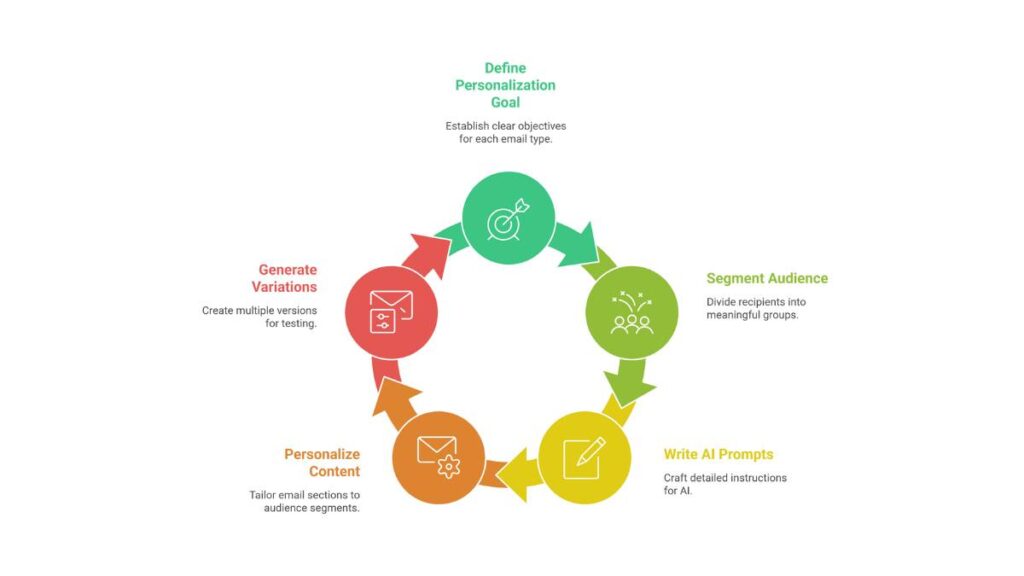
1. Define Your Personalization Goal Before Writing Prompts
Every personalized email needs a reason to exist. Not a vague one. A specific one.
Different emails solve different problems:
- Welcome emails set expectations and build early trust
- Promotional emails highlight value and relevance, not just offers
- Re-engagement campaigns remind people why they signed up in the first place
- Transactional and follow-up emails reduce friction and guide next steps
The goal shapes everything that follows. A welcome message shouldn’t sound like a sales push. A re-engagement email shouldn’t pretend that nothing went quiet.
When the goal is clear, prompts become sharper. The message knows where it’s going. Readers can feel that.
2. Segment Your Audience for AI-Driven Personalization
Personalization without segmentation is just guesswork dressed up nicely.
Effective segments don’t need to be complicated. They need to be meaningful.
- Behavioral segmentation: what someone clicked, viewed, or ignored
- Demographic-based personalization: useful when it directly affects relevance
- Purchase history and browsing behavior: signals intent better than assumptions
- Engagement-based segments: active readers vs quiet ones
Clear segments give prompts something to work with. Instead of “send this email,” it becomes “send this message to people who already showed interest but haven’t acted yet.” That’s a different conversation. A better one.
3. Write High-Quality AI Prompts for Email Personalization
Good prompts sound a lot like good briefs. They’re clear, focused, and grounded in reality.
Strong prompts usually include:
- Who the email is for
- What they care about right now
- What the email should achieve
- How the message should sound
Details matter, but there’s a balance. Too little direction leads to generic copy. Too much turns the message stiff and overworked.
Common mistakes show up fast:
- Being vague about the audience
- Ignoring pain points or intent
- Trying to control every word
The goal isn’t perfection. It’s clarity. When prompts are clear, emails sound more natural and more useful.
4. Use AI Prompts to Personalize Email Content Sections
Personalization doesn’t have to hit every line to be effective. Some sections matter more than others.
Focus on the areas readers notice first:
- Subject lines: reflect interest or intent, not just urgency
- Opening lines: acknowledge context so the email feels relevant immediately
- Body copy: adjust emphasis based on what the reader already knows
- Calls to action: align with readiness, not pressure
Tone matters here. The same message can feel helpful or pushy depending on how it’s framed. Adjusting language for different segments keeps emails from sounding copied and pasted.
5. Generate Multiple Personalized Variations Using AI Prompts
One version rarely fits everyone. And it doesn’t need to.
Creating a few thoughtful variations makes testing easier and results clearer:
- Short vs detailed explanations
- Benefit-led vs problem-led framing
- Direct vs softer calls to action
The key is consistency. The core message stays the same. The angle shifts slightly. That’s how personalization scales without losing identity or sounding robotic.
When variations are guided by intent instead of guesswork, emails stay grounded. They feel written, not generated. And that’s where performance usually improves.

Apply Now: AI-Powered Performance Marketing Course
Examples of AI Prompts for Email Personalization
It helps to look at real-world examples, just to see how a little thought can change the way an email reads. Nothing fancy; just practical ways to approach it.
Welcome emails
A quick, friendly note for new subscribers. Something like: “Thanks for joining. Here’s a little on what’s coming next.” Short, approachable, no fluff.
For people who joined through a free download, acknowledge why they’re here and suggest a next step. Small gestures like that actually get noticed.
Sales and promotional emails
If someone looked at a product but didn’t buy, talk about benefits or use cases rather than throwing a discount at them. Makes it feel useful instead of pushy.
For returning customers, highlight new features or updates. Keep it brief; assume they’ve seen some previous messages, but don’t overload them.
Re-engagement emails
A gentle nudge for folks who’ve gone quiet. Something like: “We haven’t seen you in a while; here’s what’s new.” Friendly, not guilt-tripping.
Remind people why they signed up in the first place. Focus on value, not sales pressure.
Follow-up and nurture emails
After a signup, answer common questions or guide them to the next steps. Short, clear, practical.
Nurture emails can educate or inform instead of pushing for a sale; tips, insights, and reminders tied to their interests.
The point is simple: consider who’s reading and what they need. That’s what makes an email feel personal rather than templated.
Best Practices for AI Email Personalization Using Prompts
There’s a fine line between relevant and overbearing. Done right, personalization is subtle. A few things tend to help:
Keep it human. Don’t try to be too clever or perfect; the reader can tell.
Use personal data carefully. Less is usually more. A few thoughtful details beat cramming in everything you know.
Check before sending. Even a quick glance from a human can catch awkward wording or tone that’s off.
Stay on brand. Personalization should adapt the message, not change the voice.
Iterate. Watch what works, tweak prompts, and try again. Nothing lands perfectly the first time.
The goal is connection, not impressing anyone. When it’s useful and timely, people respond naturally.
Common Mistakes to Avoid When Personalizing Emails with AI Prompts
Most mistakes come from rushing or assuming. Some things to watch out for:
Vague prompts. If instructions aren’t clear, emails end up flat and generic.
Ignoring context. Sending the same message to everyone rarely works. Even small differences in behavior or timing can change how the email feels.
Too much personalization. Overloading with details can feel invasive or weird. Less is often better.
Skipping testing. Don’t assume a prompt works perfectly; try small variations first.
Reusing prompts blindly. What worked for one campaign may flop in another. Always adjust for audience and timing.
The secret is paying attention, testing, and being willing to tweak. When done thoughtfully, even small adjustments can make emails feel alive rather than mechanical.
Measuring the Success of AI-Personalized Emails
Looking at email results isn’t just about checking a bunch of numbers. Some of it is obvious, some of it… not so much.
Open rates and clicks
Sure, they tell part of the story. A subject line that gets opened is doing its job. Clicks? That’s the next layer; it shows if the content actually resonated or made sense.
Conversions and actions
This is where the rubber meets the road. Did people sign up, buy, or take that next step? If not, something in the message didn’t connect.
Segment-level insights
Breaking results down by audience segments is where surprises show up. What works for one group can flop for another. A little curiosity goes a long way.
Look for patterns
Small repeated wins matter. Certain lines might consistently get a click. Certain offers might underperform. Notice those trends; they’re gold for tweaking future emails.
The point is to treat numbers like clues, not the final answer. Tiny adjustments, based on what actually happens, often make a big difference.
Future of Email Personalization Using AI Prompts
Email marketing isn’t frozen in time. The future is about subtle, smart adjustments rather than just bigger campaigns.
Predictive personalization
Think of it as nudging someone in the right direction before they even realize it. Not creepy; just useful if done right.
Real-time tweaks
Messages that shift slightly depending on engagement are gaining ground. Even minor changes, like swapping a line or reordering content, can improve relevance.
Understanding intent, not just behavior
It’s not enough to know what someone clicked last week. The goal is to grasp why they acted and anticipate what might help next.
Marketers who pay attention to patterns, context, and timing will always get further than those who rely purely on templates. The human touch still matters, more than ever.
Conclusion:
At the core, personalization isn’t a tech problem; it’s a thinking problem. The more thought that goes into the message, the better it lands.
Good emails:
- Feel helpful, not pushy
- Keep a consistent voice, but adapt to the reader
- Anticipate what the reader needs next, without overloading them
Prompts are the unsung heroes here. A carefully thought-out prompt shapes the email’s tone, clarity, and relevance. Test different angles, tweak as you go, and pay attention to what sticks. It takes a bit of patience, but the payoff is emails that actually feel like a conversation instead of just noise.
FAQs: About Personalizing Emails Using AI Prompts
1. What does it mean to personalize emails using AI prompts?
Basically, it’s about shaping your email so it actually speaks to the person reading it. That could be subject lines, the first few sentences, or even the call-to-action. The aim is to make it feel like the email isn’t just another generic blast, but something meant for that reader.
2. How is this different from the usual email personalization?
Most people stop at inserting first names. Prompts let the content bend a little based on context, behavior, or interests. So it’s not just “Hi John,” it’s making the message more relevant, more natural.
3. What kind of data do you need to make this work?
Engagement history, past purchases, maybe some demographic info; enough to make the email feel relevant. Not so much that it gets creepy. It’s a balance.
4. Can prompts handle different audience segments?
Yep. You can nudge the message to speak differently depending on the group. Some might get a friendly tone, some more formal. Offers or content can change, too. It’s about making the email feel like it was written for that particular reader.
5. Is it safe to use personal data this way?
As long as it’s done responsibly. Stick to what people have opted into, don’t overreach, and keep privacy rules in mind. Personalization should feel helpful, not intrusive.
6. Will personalized emails really get better opens and clicks?
Usually, yes. If people feel the message is relevant to them, they pay attention. That’s often enough to bump up opens and clicks compared to generic emails.
7. How specific should prompts be?
Enough to give clear guidance, but not so much that it feels stiff. Think of it like setting a direction rather than scripting every word. A little wiggle room helps the content sound more natural.
8. Can prompts keep emails on-brand?
They can. By giving tone and style instructions, the emails stay consistent with the brand voice. Even when the content changes a bit, readers still recognize your style.
9. Should someone review these emails before sending?
Definitely. A quick check helps catch anything off, weird phrasing, or tone that doesn’t fit. Human eyes keep things trustworthy and smooth.
10. Is this approach realistic for small businesses?
Absolutely. Even small teams can use prompts to make emails feel more personal without spending forever writing each one. Start small, test, see what works, then scale gradually.