

How to Automate Social Media Reporting Using Metricool answers a problem most marketers quietly struggle with: reporting takes too long, and the insights often arrive too late. Manual spreadsheets, copy-pasting numbers, second-guessing accuracy; it adds up. This guide breaks down how Metricool simplifies that entire process. It walks through setting up accounts, choosing metrics that actually matter, and turning raw data into reports people want to read. Not bloated. Not over-engineered. Just clear, repeatable reporting across platforms like Instagram, LinkedIn, TikTok, and YouTube. The focus stays practical: what to automate, what still needs a human eye, and how to build a reporting system that scales without losing context. Less busywork. Better decisions. Reports that finally earn their keep.
Table of Contents
Introduction:
Why Automating Social Media Reporting Matters in 2026
Social media reporting can be… well, kind of a pain, right? Pulling numbers from one platform, then another, juggling spreadsheets; it’s tedious and, honestly, mistakes happen more often than anyone admits. By the time a report is ready, it can already feel stale.
Automation changes that. Not because it’s fancy, but because it actually makes the work useful. A few things it does well:
- Cuts down mistakes. No more copy-paste errors or mismatched metrics.
- Keeps reports consistent. They come out when they’re supposed to. No scrambling at the last minute.
- Speeds up decisions. Insights are ready when the team or the client needs them.
Tools like Metricool are becoming almost a must-have. They pull all the data into one place, let reports run automatically, and give something that’s readable and actionable. By 2025, doing reports manually is basically a choice to waste time.
What Is Social Media Reporting Automation?
Let’s put it in plain terms. Social media reporting automation is basically letting a tool handle the tedious, repetitive stuff; the part nobody actually enjoys. Things like pulling metrics, calculating engagement, tracking follower growth, reach, clicks… and then packaging it all into a report that actually makes sense.
Now, think about doing it the old-fashioned way:
Open every platform separately: Instagram, Facebook, LinkedIn, TikTok…
Hunt down the numbers for likes, shares, clicks, and impressions.
Copy them into a spreadsheet, make sure formulas work, and format it so it doesn’t look like a mess.
Double-check, triple-check, because one slip and the whole report’s off.
Yeah, it’s a nightmare. Time-consuming, boring, and honestly, mistakes happen even if you try really hard. Automation flips that on its head:
The tool grabs all the numbers for you in one place.
It builds the report automatically, sometimes even with charts and visual highlights.
It delivers it on schedule, like clockwork.
Fewer errors, way faster, and much easier to scale. Suddenly, weekly reports that used to take hours can be done with almost no effort. And that’s the whole point: freeing up time to actually do something with the data, instead of just hunting for it.
Who gets the most out of it? Basically, anyone who needs to make sense of social media numbers:
- Marketers running campaigns
- Agencies juggling multiple clients
- Social media managers keep a calendar organized
- Founders and business owners tracking ROI
The point is simple: if social media is part of your strategy, automation saves time and gives clarity. That’s it.
Why Use Metricool for Social Media Reporting Automation?
Metricool isn’t just another analytics tool; it’s one of those rare ones that actually works without a learning curve, but still grows with you. Here’s why it makes life easier:
Covers all the big platforms: Instagram, Facebook, LinkedIn, X, TikTok, YouTube, Google Business Profile… one place for everything. No hopping around.
Beginner-friendly, but can scale: You don’t have to be a data wizard to use it, but it can handle multiple accounts, clients, and brands without choking.
Reports that look professional: Logos, colors, layouts; you can customize them so clients or stakeholders actually like looking at them.
Not overcomplicated: Most reporting tools either overwhelm with dashboards or underdeliver on insights. Metricool hits a good balance.
The real takeaway? If reporting feels like a chore, Metricool smooths out the bumps. You get clean, accurate data, delivered on time, and actually useful. Then there’s time left for strategy instead of just crunching numbers.
How to Automate Social Media Reporting Using Metricool (Step-by-Step)
Automating reports sounds nice on paper, but the trick is actually making them useful. It’s not just about clicking a few buttons and hoping the numbers make sense. Metricool helps a lot, but there’s a rhythm to getting it right.
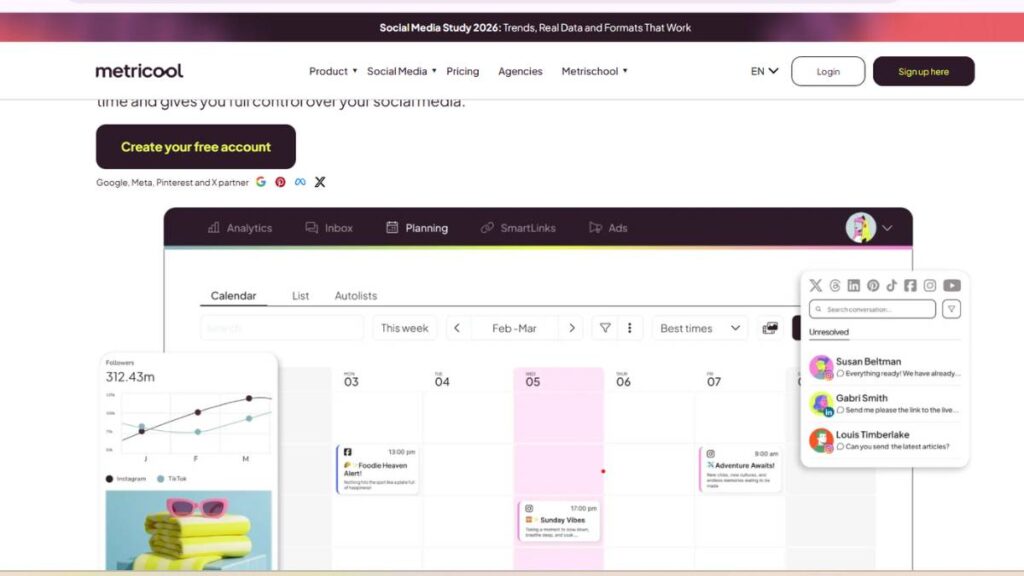
1. Setting Up Your Metricool Account for Reporting Automation
Before anything starts running automatically, the accounts need to be connected properly. It’s tempting to rush this part, but skipping details can cause headaches down the line.
Connect the right accounts: Make sure you’re linking business accounts, not personal ones. Instagram, Facebook, LinkedIn, X, TikTok, YouTube, Google Business Profile; all in one place.
Permissions matter: Some platforms need admin access or special permissions to pull metrics. If the report is missing data, this is usually why.
Common setup hiccups:
- Wrong account type (personal instead of business)
- Skipping verification or access prompts
- Forgetting to sync new profiles after adding them
A little patience here saves a lot of frustration later.
2. Choosing the Right Social Media Metrics in Metricool
One of the biggest mistakes is tracking everything because it exists. Not all numbers are equally useful. Pick the metrics that actually tell a story about your goals.
Reach, impressions, engagement rate – shows who sees your content and how they interact.
Follower growth and audience insights – tells you if your community is growing and what kind of people are engaging.
Clicks, traffic, conversions – essential if you’re trying to drive website visits or sales.
Tip: start small. A focused set of KPIs beats a cluttered report that no one reads.

Enroll Now: Live Digital Marketing Course
3. Creating Automated Social Media Reports in Metricool
Once the metrics are decided, it’s time to build the report. The tool makes this easy, but there’s still a bit of finesse involved.
Use templates – Metricool has prebuilt templates that save time, but tweak them so they make sense for your audience.
Platform-specific customization – Instagram stories won’t have the same metrics as LinkedIn posts. Make each report relevant.
Branding matters – add logos, colors, and a consistent layout. It looks professional, and it shows attention to detail.
Think of reports like a story. Raw numbers are fine for a dashboard, but a report should guide someone through what’s actually happening.
4. Scheduling Automatic Social Media Reports
Automation is only useful if reports actually reach the right people on time.
Frequency – weekly works for internal teams, keeping tabs on performance; monthly is better for clients or higher-level updates.
Email delivery – Metricool can send reports straight to inboxes. Saves a ton of time compared to manual downloads.
Adjust for context – some campaigns change daily, some monthly. Don’t overdo it with daily reports unless someone will actually use them.
A little planning here keeps reports from being ignored.
5. Exporting and Sharing Automated Reports
Finally, reports need to be in a format that makes sense.
Export options – PDF or PPT, depending on who’s looking at it. PDF is quick and clean; PPT works if someone wants to present it.
Live dashboards vs static reports – dashboards are great for teams checking metrics regularly. Static reports are better for formal updates.
Add context when needed – automated reports are great, but sometimes a note or short commentary makes them much more actionable.
Automated reporting isn’t “set it and forget it.” Even a simple review ensures the numbers actually tell a story instead of just existing.
Best Practices for Automated Social Media Reporting with Metricool
Automated reports can save a ton of time, but only if they’re done smartly. It’s easy to fall into the trap of thinking “more data = better report,” but that’s rarely true.
A few things that actually make reports useful:
Forget vanity metrics – Likes and reactions are nice, but they don’t pay the bills. Focus on metrics that show real impact: clicks, conversions, or audience growth.
Keep it readable – Don’t cram 50 metrics into a single report. Highlight trends, spikes, dips; stuff that tells a story.
Match metrics to goals – Tracking reach is pointless if the campaign is about driving leads. Let the numbers reflect the purpose.
Update KPIs as you go – Social media shifts fast. What mattered last quarter might not matter now. Reports need to evolve, not stay frozen.
Add small notes or context – Even one or two sentences pointing out why something spiked or dropped can make the difference between a report that’s glanced at and one that actually informs decisions.
Think of reports as tools, not trophies. They exist to guide action, not just impress stakeholders.
Common Mistakes to Avoid When Automating Social Media Reports
Automation makes reporting easier, but it’s not foolproof. Some common slip-ups that trip people up:
Blindly trusting automation – Systems can fail or pull incomplete data. A quick check every now and then keeps you from sending out misleading reports.
Skipping commentary – Numbers alone rarely tell a story. Even a short note on trends or anomalies helps the reader understand what’s going on.
Tracking too much at once – Throwing every metric into a report just creates noise. Focus on what actually matters.
Not cross-checking with platforms – Sometimes numbers differ slightly between Metricool and the social platforms themselves. Spot-checking prevents surprises and keeps credibility intact.
The gist: automation doesn’t replace thinking. Reports are only valuable if someone actually interprets them.
Metricool Reporting Use Cases (Real-World Scenarios)
Automated reporting shines when it’s applied in the right context. Here’s where it really makes life easier:
Agencies with multiple clients – Branded, consistent updates without having to rebuild reports every week. Saves hours and reduces errors.
In-house marketing teams – Keep everyone on the same page, help spot trends early, and support faster decision-making.
Freelancers managing multiple brands – One dashboard for multiple accounts keeps reporting consistently and is less mentally exhausting.
Founders or business owners – Quick snapshots of ROI, growth, and engagement let leadership see what’s actually working without digging into spreadsheets.
The takeaway? Automated reporting isn’t just a time-saver. It’s about clarity. Making metrics meaningful and usable, no matter who’s looking at them.
How Metricool Automated Reports Support Better Decision-Making
Numbers are only useful if someone actually understands them. Metricool’s automated reports aren’t just about showing what happened; they help figure out why it happened and what to do next.
See what really works – Not all posts are created equal. Some get engagement, some don’t. Reports make it clear which content is hitting the mark. Then future posts can lean into that style or topic.
Spot trends over time – Weekly or monthly comparisons quickly show patterns. Maybe engagement spikes on certain days, or a type of content is slowly gaining traction. Those small insights can change the posting strategy.
Fine-tune schedules and formats – Knowing when your audience is most active is half the battle. Automated reports show the best times to post, which saves trial and error.
Turn insights into action – Raw numbers are fine, but they don’t tell a story. Short notes, highlights, or trend observations make the report something people actually use.
Basically, the goal isn’t just to track numbers; it’s to make them matter. Otherwise, they just sit there, ignored.
Metricool Pricing and Reporting Features (What You Need to Automate Reports)
Not every team needs the same plan, and knowing what you actually need before paying matters.
Free plan – Offers basic automated reporting for a few accounts. Enough to see if automation helps without spending money. Good for a solo marketer or a very small team.
Paid plans – Unlocks more advanced stuff: multiple accounts, branded reports, more scheduling options, and deeper analytics. Agencies and larger teams usually need these for efficiency.
Which plan makes sense? If the reporting needs are light, start free. If managing multiple clients or accounts, the paid plan is worth it for the time saved and added customization. No point paying for features that won’t be used.
The trick is matching features to real needs. Don’t overcomplicate things.
Is Metricool the Right Tool for Automating Social Media Reporting?
It depends on what you need, but for most teams, it’s solid.
Where it shines – Small to medium teams, freelancers, agencies, or founders who want simple, understandable reports. The setup is fast, and reports are easy to read.
When it might fall short – Very large companies with super complex reporting needs or very niche KPIs might need something more customizable. Metricool handles the majority of metrics, but won’t cover every edge case.
Final take – For everyday reporting, Metricool hits a sweet spot: it automates, keeps things consistent, and delivers insights that actually help make decisions. It’s practical without being overengineered.
In short, if the goal is reliable, automated social media reporting without too much headache, Metricool does the job, and does it well.
Conclusion:
Here’s the reality: manual reporting doesn’t cut it anymore. By the time a human compiles the numbers, they’re already a little outdated. Automation isn’t fancy; it’s necessary.
Start simple – Don’t track everything at once. Pick a few KPIs that matter most and get the process running. Complexity can come later.
Integrate reporting into daily work – Reports aren’t just PDFs. They should feed insights into decisions: what content to boost, what times to post, and where the audience is most active.
Consistency matters – Regular reports, same metrics each time, keep stakeholders aligned. It’s easier to spot trends when the structure is predictable.
Make it actionable – Numbers alone are boring. Highlight what changed, why it might have changed, and what should happen next. That’s what turns reports from “look at this” into “do this.”
Metricool can handle the heavy lifting, but the real value comes from how the team uses those insights. Start small, be consistent, and over time, it becomes a system that actually guides strategy rather than just showing numbers.
FAQs: Automating Social Media Reporting Using Metricool
1. Can Metricool handle multiple platforms at once?
Yep. That’s one of its big time-savers. Instead of hopping between Instagram, Facebook, TikTok, and whatever else, you can pull data into one report. No juggling multiple tabs or spreadsheets.
2. Is the data accurate?
Mostly, yes. Numbers line up pretty well, but sometimes there are tiny differences compared to the platform itself. That’s normal; tracking methods aren’t identical. Spot-checking the main metrics once in a while keeps things honest.
3. Can reports be customized for different clients?
Definitely. Branding, colors, logos, which KPIs to show, which accounts to include; you get a lot of flexibility. Makes it much easier to manage multiple clients without redoing reports every time.
4. Is it good for beginners?
For sure. The templates and interface are straightforward enough that someone new to analytics can get something useful out in minutes. And if needs grow, it scales without feeling overwhelming. A few minutes spent on setup here saves hours later. That’s the real advantage.