

How to Use Google Analytics AI Insights is really about learning when to listen and when to dig deeper. These insights surface unusual changes, patterns, and predictions automatically, saving hours of manual analysis. The key is knowing how to read them, validate what’s behind the signal, and turn them into practical actions. From spotting traffic drops early to understanding shifts in conversion behavior, Google Analytics AI insights help teams focus on what actually needs attention. They don’t replace analysis, but they do sharpen it. Used the right way, they guide smarter decisions, faster responses, and clearer priorities across marketing, content, and growth efforts.
Table of Contents
Introduction:
Why Google Analytics AI Insights Matter for Modern Analytics
Analytics used to be about checking numbers. Sessions up, sessions down. Conversions good, conversions bad. That worked when websites were simpler, and traffic patterns were predictable. That world doesn’t exist anymore.
Google Analytics AI insights are built for the reality marketers deal with now: dozens of channels, constantly shifting user behavior, and more data than anyone has time to manually analyze. Instead of staring at dashboards and hoping something jumps out, AI insights surface what actually matters: unexpected changes, emerging trends, and performance shifts that deserve attention.
Traditional analytics dashboards still show what happened. AI insights go a step further and suggest why it might have happened. That difference saves time and, more importantly, helps teams act faster.
These insights are especially useful for:
- Marketers tracking campaign and content performance
- Founders who want quick clarity without deep analysis
- Analysts managing large or complex datasets
- Ecommerce teams are watching revenue, conversions, and retention
At a high level, Google Analytics AI insights help cut through noise. They don’t replace thinking or strategy, but they do make analytics feel less overwhelming and far more actionable.
What Are Google Analytics AI Insights in GA4?
Google Analytics AI insights are automated observations generated inside GA4 using machine learning. They scan your data continuously and flag patterns, anomalies, and trends that might otherwise go unnoticed.
Instead of manually digging through reports, GA4 highlights things like:
- Sudden drops or spikes in traffic
- Changes in conversion behavior
- Shifts in user engagement
- Early signals that something is off, or performing unusually well
The biggest difference between standard GA4 reports and AI-driven insights is intent. Reports wait for you to ask questions. AI insights proactively surface potential answers.
GA4 uses machine learning models to analyze event-based data across users, sessions, and time. The system looks for deviations from expected behavior and presents them in plain-language summaries. Not perfect explanations, but useful starting points.
These insights are designed to answer questions such as:
- “Why did traffic drop yesterday?”
- “Which audience is suddenly converting more?”
- “Is this spike normal, or a problem?”
For busy teams, the shift from hunting for issues to being alerted to them is where the real value lies.
How Google Analytics AI Insights Work Behind the Scenes
GA4 is built around events, not pageviews. Every interaction, page load, scroll, click, and purchase feeds into a larger behavioral dataset. AI insights work by analyzing patterns across those events over time.
Behind the scenes, GA4 models what “normal” performance looks like for your property. When something deviates from that baseline, it gets flagged as an insight.
A few key pieces make this possible:
- Machine learning models that learn from historical data
- Event-based tracking that captures granular behavior
- Comparative analysis across time periods, audiences, and channels
Anomaly detection is a core part of this. If traffic suddenly drops 30% compared to recent patterns, GA4 doesn’t just show the drop; it points it out and offers context around where the change came from.
AI insights also get better as more data accumulates. With limited data, insights can be sparse or less reliable. With consistent tracking and volume, patterns become clearer and insights more useful.
This is why clean tracking and patience matter. AI insights aren’t magic. They’re pattern recognition at scale.
Where to Find Google Analytics AI Insights in GA4
GA4 doesn’t hide AI insights, but it also doesn’t always make them obvious at first glance. Knowing where to look saves a lot of frustration.
You’ll typically find AI insights in a few key areas:
- Insights Hub, which aggregates automated insights in one place
- Home dashboard, where notable changes are surfaced upfront
- Report-level insights, tied to specific metrics or dimensions
The Insights Hub is the most direct way to explore what GA4 has detected recently. It acts as a running feed of observations: traffic changes, performance shifts, and emerging trends.
Home dashboard insights are more contextual. They highlight what GA4 thinks is important right now, based on recent activity.
There’s also an important distinction between:
- Automated insights, generated by GA4
- Custom insights, created by you with defined conditions
Automated insights help you discover issues. Custom insights help you monitor the things you already care about. Both have a place, and using them together is where GA4 becomes far more useful than a static reporting tool.
How to Use Google Analytics AI Insights Step by Step
Using Google Analytics AI insights isn’t about checking a box or skimming alerts once a week. The real value comes from knowing how to read them, when to trust them, and how to connect them back to real business decisions. This section breaks down how to actually use these insights in a practical, repeatable way.
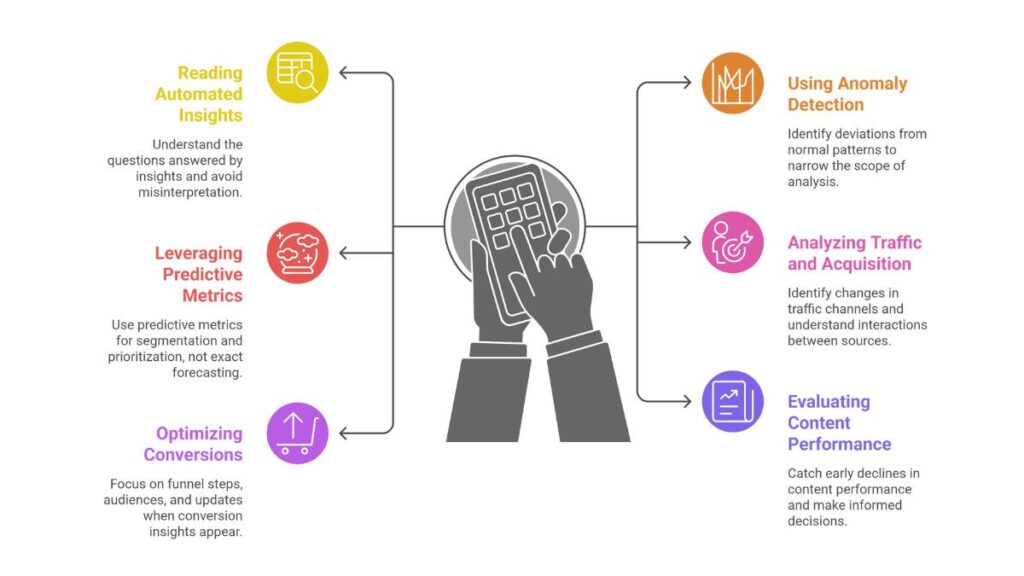
1. How to Read Automated Insights in GA4
Automated insights usually show up as short summaries explaining that something changed. Traffic dropped. Conversions spiked. Engagement shifted. The mistake many people make is either ignoring these cards completely or taking them at face value.
Each insight typically answers three quiet questions:
- What changed?
- How significant is the change?
- Where did it likely come from?
The “why this happened” explanation is a starting point, not a conclusion. It highlights contributing dimensions: channels, pages, audiences, but it doesn’t replace analysis. Treat these insights like a good analyst tapping you on the shoulder and saying, “You might want to look here.”
Over time, patterns emerge. Some insights repeat and aren’t actionable. Others signal real issues or opportunities. Learning to tell the difference is part of the process.
2. How to Use GA4 Anomaly Detection Insights
Anomaly detection is one of the most useful parts of GA4 AI insights, especially for large or fast-moving websites. Instead of manually comparing dates, GA4 flags behavior that deviates from normal patterns.
Common scenarios include:
- Sudden traffic drops from a specific channel
- Unexpected spikes in sessions or events
- Conversion rates are shifting without an obvious cause
When an anomaly appears, the goal isn’t to panic. It’s to narrow the scope. Start by identifying:
- Which channel or source changed
- Which pages or events were affected
- Whether the change is isolated or widespread
Some anomalies correct themselves. Others point to tracking issues, campaign problems, or site changes. The insight helps surface the moment; context determines the response.

Apply Now: AI-Powered Performance Marketing Course
3. How to Use Predictive Metrics in Google Analytics
Predictive metrics add a forward-looking layer to analytics, which is where many teams get stuck or confused. These metrics don’t predict exact outcomes. They estimate the likelihood based on historical behavior.
The most commonly used predictive metrics include:
- Purchase probability
- Churn probability
These metrics work best when used for segmentation, not forecasting revenue down to the decimal. For example:
- Identifying users more likely to convert and tailoring messaging
- Spotting high churn risk audiences and adjusting retention efforts
Predictive insights should guide prioritization, not replace judgment. They are directional, not definitive, and they work best when combined with a clear understanding of your audience and funnel.
4. How to Use AI Insights for Traffic and Acquisition Analysis
Traffic analysis is where AI insights save the most time. Instead of checking every channel manually, GA4 surfaces changes that matter.
These insights help answer questions like:
- Which channel is driving the biggest change in traffic?
- Is organic growth slowing, or is paid traffic compensating?
- Are referral or social sources behaving differently than usual?
Rather than looking at channel reports in isolation, AI insights show how acquisition sources interact. A drop in one channel often coincides with a rise in another. Seeing those connections faster helps avoid misattribution and overreaction.
Used consistently, these insights shift traffic analysis from reactive reporting to proactive optimization.
5. How to Use Google Analytics AI Insights for Conversion Optimization
Conversion insights are where AI-driven analysis becomes directly tied to revenue and outcomes. GA4 surfaces changes in conversion rates, funnel behavior, and event completion that would otherwise take time to uncover.
When a conversion insight appears, focus on:
- Which step in the funnel changed
- Which audience or traffic source was most affected
- Whether the change aligns with recent site or campaign updates
These insights don’t tell you how to fix a problem, but they help you find where the problem lives. That alone shortens optimization cycles and prevents teams from guessing blindly.
6. How to Use AI Insights for Content Performance Analysis
Content performance often declines slowly, then suddenly. AI insights help catch that early. Instead of waiting for traffic reports to look bad, GA4 flags pages or content groups behaving differently than expected.
These insights are especially useful for:
- Identifying pages gaining traction without promotion
- Spotting declining engagement before traffic drops
- Understanding which content changes are impacting behavior
Used well, content insights support smarter updates, better prioritization, and more informed decisions about what to refresh, expand, or retire.
The key is consistency. Checking insights regularly builds intuition. Over time, they stop feeling like alerts and start feeling like signals; quiet, useful ones that help guide smarter action.
How to Create Custom AI Insights in Google Analytics
Automated insights are helpful, but they’re generic by design. Custom AI insights are where GA4 starts to feel tailored to the way a business actually operates. Instead of waiting for GA4 to flag something on its own, custom insights let you define what “important” looks like.
The main difference is control. Automated insights decide what’s unusual. Custom insights let you decide what’s unacceptable, risky, or worth immediate attention.
Custom insights work best when they’re tied to outcomes, not vanity metrics. Examples that tend to matter:
- Sudden drops in conversions or key events
- Unusual spikes in traffic from a single source
- Engagement changes on high-value pages
- Revenue or purchase behavior shifting outside normal ranges
Setting thresholds is where most people go wrong. Too tight, and it alerts fire constantly. Too loose, and real issues slip by. The sweet spot usually comes from looking at historical ranges and setting conditions that flag meaningful deviations, not daily noise.
Alert-based insights are especially useful for teams that can’t live inside GA4 every day. They bring problems to you, instead of relying on someone to notice them during a routine check-in.
Custom insights won’t replace regular analysis, but they dramatically reduce the chance of missing something critical.
How to Use Google Analytics AI Insights for Better Business Decisions
Insights only matter if they change decisions. Otherwise, they’re just notifications dressed up as intelligence.
The most effective way to use GA4 AI insights is to treat them as prioritization signals. Not every insight deserves action. Some deserve investigation. A few deserve immediate response.
A practical way to filter insights:
- Does this impact revenue, leads, or retention?
- Is the change isolated or part of a broader pattern?
- Can the cause be reasonably identified or tested?
High-impact insights should trigger questions, not assumptions. A conversion drop might be caused by traffic quality, a page issue, or even external factors. The insight narrows the field. Judgment fills in the rest.
AI insights also help reduce decision bias. Instead of focusing only on metrics someone already cares about, they surface changes across the entire property. That broader view often highlights opportunities or risks that wouldn’t make it into a standard report.
Used consistently, insights support faster, more confident decisions; not because they’re always right, but because they highlight where attention is needed most.
Common Mistakes When Using Google Analytics AI Insights
The biggest mistake is treating AI insights as answers instead of prompts. They’re signals, not conclusions.
Another common issue is trusting every insight equally. Some changes look dramatic but don’t matter. Others look small but affect high-value users. Context is everything.
Misinterpreting correlation is another trap. Just because GA4 suggests a contributing factor doesn’t mean it caused the change. Timing, seasonality, campaigns, and external events all influence behavior.
Data quality problems quietly undermine insights:
- Missing or inconsistent event tracking
- Poorly defined conversions
- Changing setups without documentation
When the data is messy, insights become less reliable. Not wrong; just less useful.
Finally, many teams forget to look beyond GA4. Insights explain what changed inside the data, not what happened in the real world. Product launches, pricing changes, outages, promotions; none of those exist in isolation.
AI insights work best when paired with human context. Ignoring that context is how good signals turn into bad decisions.
Best Practices to Get More Accurate AI Insights from GA4
AI insights are only as good as the data feeding them. When insights feel vague or inconsistent, the issue usually isn’t the system; it’s the setup behind it.
Clean event tracking comes first. Key actions should be tracked consistently across the site, without duplicates or gaps. When similar actions are tracked under different names or structures, patterns get muddy, and insights lose clarity.
Naming conventions matter more than they seem. Clear, stable event and parameter names make it easier to spot trends over time. Constantly changing labels or definitions makes long-term patterns harder to detect.
Historical data plays a quiet but important role. Insights become more reliable as GA4 understands what “normal” looks like for your property. Frequent resets, major tracking changes, or short data windows limit that learning.
Connections also matter. Linking GA4 with other data sources adds context to insights and improves attribution. It helps explain not just that something changed, but where that change likely originated.
Accuracy isn’t about perfection. It’s about consistency. The more stable and intentional the setup, the more useful the insights become.
Google Analytics AI Insights vs Manual Analysis
AI insights and manual analysis aren’t competitors. They solve different problems.
AI insights are best at:
- Monitoring large volumes of data continuously
- Spotting unexpected changes quickly
- Highlighting areas that deserve attention
Manual analysis shines when:
- Understanding nuance and intent
- Evaluating long-term strategy
- Connecting data to business realities
Relying only on AI insights can lead to shallow conclusions. Relying only on manual analysis slows teams down and increases the risk of missed signals.
The strongest approach combines both. Let insights surface what’s changing. Use human judgment to decide why it matters and what to do next.
This balance keeps analytics efficient without becoming reactive or detached from context.
Limitations of Google Analytics AI Insights (What They Can’t Do)
AI insights are powerful, but they have clear limits, and ignoring those limits leads to bad decisions.
Data thresholds are a common constraint. Low-volume sites or new properties may see fewer insights or insights that feel generic. Without enough data, patterns are harder to detect reliably.
There are also industry-specific blind spots. Behavioral patterns vary widely between content sites, ecommerce stores, SaaS platforms, and lead-based businesses. Insights don’t always understand those nuances.
Most importantly, AI insights don’t understand intent, strategy, or external events. They can’t explain pricing changes, product launches, outages, or market shifts unless those changes show up clearly in the data.
AI insights offer guidance, not answers. They point to what changed and where to look. The interpretation and the decision still belong to the person reading them.
How Google Analytics AI Insights Fit into Google’s AI Mode
Search behavior has changed. People are no longer browsing ten blue links and piecing things together on their own. They expect clear answers, fast explanations, and context that actually helps them decide what to do next.
That’s where structured analytics explanations matter.
Google Analytics AI insights naturally align with this shift because they focus on clarity over complexity. They surface what changed, where it changed, and what might be influencing it, without forcing users to dig through layers of reports.
Clear analytics explanations work well in this environment because they:
- Focus on outcomes, not just metrics
- Explain changes in plain language
- Connect behavior to intent
When analytics content mirrors this structure, clear sections, direct answers, and practical interpretation, it becomes easier for Google to extract meaning and surface it in summaries.
AI insights don’t just help inside GA4. They influence how analytics knowledge itself is consumed. Less theory. More “what happened and why it matters.”
Conclusion:
Google Analytics AI insights work best when they’re treated as support, not authority.
They’re excellent at spotting change. They’re helpful at narrowing focus. They save time by pointing attention in the right direction. What they don’t do is think strategically, understand context, or make judgment calls.
That part still matters.
The most effective teams use AI insights as a filter:
- What deserves attention right now?
- What changed that could impact outcomes?
- Where should analysis start, not end?
Context, experience, and business understanding turn insights into action. Without that layer, even the smartest signals fall flat.
As GA4 continues to evolve, the role of AI insights will grow, but their value will always depend on how thoughtfully they’re used.
FAQs:
1. Are Google Analytics AI insights accurate?
They’re useful, but not something to follow blindly. These insights are best at showing direction; something changed, something looks off, something is worth a closer look. Accuracy improves when tracking is clean, and data is steady over time. Treat them like an experienced analyst flagging an issue, not delivering a final verdict.
2. Do AI insights replace analysts?
Not even close. They speed up detection, not thinking. Insights surface patterns, but they don’t understand business goals, campaign context, or real-world changes. Analysts still connect dots, challenge assumptions, and decide what actually matters. The work just shifts from hunting for problems to deciding how to respond to them.
3. Is GA4 AI available for free?
Yes, it’s included by default in GA4. That said, availability doesn’t always mean usefulness. Smaller sites or newer properties may not see much at first. As data builds and tracking stabilizes, insights start appearing more consistently. It’s less about pricing and more about whether the data gives the system enough to work with.
4. How often do AI insights update?
There’s no fixed schedule. Some changes surface quickly, especially sharp spikes or drops. Others take time, since they rely on patterns forming over days or weeks. Updates depend on data volume and how unusual the change is. Quiet shifts often show up later, once there’s enough evidence to call them meaningful.
5. How do Google Analytics AI insights differ from GA4 Explorations?
AI insights tell you where to look. Explorations help you understand what’s happening once you get there. One is reactive, surfacing unexpected changes automatically. The other is deliberate, used when there’s already a question in mind. They work best together; signal first, deep dive second.
6. Why are Google Analytics AI insights not showing for my property?
This usually comes down to volume or consistency. Low traffic, new setups, or uneven event tracking limit what can be detected. Sometimes everything is working fine; there’s just not enough data yet. As activity increases and tracking settles, insights tend to appear more naturally over time.
7. Can Google Analytics AI insights be used for ecommerce optimization?
Absolutely. They’re especially helpful for spotting shifts in revenue, conversion rates, and purchasing behavior before they become obvious in reports. A sudden drop, an unexpected lift, a funnel step acting differently; those moments surface faster, which gives ecommerce teams a head start on diagnosing and fixing issues.
8. How reliable are Google Analytics AI insights for low-traffic websites?
They’re more limited, simply because patterns are harder to confirm with small numbers. Insights may show up less often or feel broader. That doesn’t make them useless, just less precise. For low-traffic sites, they work best as supporting signals alongside manual checks and common-sense analysis.
9. How often does Google Analytics update its insights?
Insights refresh continuously as new data comes in, but they don’t fire for every small movement. Larger, unusual changes stand out faster. Smaller trends take time to form and be recognized. Think of it as ongoing monitoring rather than scheduled updates; always watching, speaking up when something really shifts.