

AI No-Code Tools has become one of those topics everyone mentions, but few explain properly. This blog slows things down and looks at what’s actually happening on the ground in 2026. It starts with the basics: what these tools are and why marketers, not developers, are the ones using them day to day. From there, it moves into how teams are automating campaigns, creating content, handling data, and keeping workflows from falling apart. The middle of the guide gets specific, breaking down the tools that show up most often in real stacks and why they’re chosen. It wraps with practical examples, trade-offs to watch for, and clear answers to the questions teams usually ask right before they commit.
Table of Contents
Introduction
1. What Are AI No-Code Tools?
AI no-code tools are often explained in technical terms, which already misses the point. In practice, these tools exist for one reason: to let non-technical teams build things that used to require engineers, analysts, or long approval cycles. Marketing teams don’t need another layer of complexity. They need tools that translate ideas into action without friction.
At a basic level, these platforms combine visual builders with intelligent decision-making. Instead of writing logic in code, marketers work with flows, conditions, and simple rules that mirror how campaigns actually run. If a lead behaves a certain way, something happens. If performance drops, something changes. The intelligence runs quietly in the background.
What makes this shift important is not novelty. It’s control. Teams are no longer stuck explaining requirements back and forth or waiting weeks to test a simple idea. Work moves closer to the people who understand the audience best. That alone changes how marketing operates day to day.
2. How AI No-Code Tools Are Transforming Marketing in 2026
Marketing in 2026 is less about big launches and more about constant adjustment. Campaigns evolve mid-flight. Messaging changes based on real responses, not assumptions. AI no-code tools fit naturally into this environment because they remove delay.
Speed gets talked about a lot, but the real gain is responsiveness. When something works, teams can lean into it immediately. When it doesn’t, they can pull back without sunk cost. That flexibility used to belong only to highly resourced teams. Now it’s accessible much earlier.
There’s also a quieter shift happening. Marketing teams are becoming more self-sufficient. Fewer dependencies. Fewer bottlenecks. Instead of patching together disconnected tools, workflows start to feel intentional. Costs stabilize. Output increases. And the team spends less time managing tools and more time thinking about strategy. That balance matters more than most realize.
3. How This Guide Helps You
This guide isn’t built to impress with feature lists or buzzwords. It’s meant to help marketers make sense of where no-code AI tools actually fit and where they don’t. Some tools save time. Others save money. A few genuinely change how teams think about execution.
The focus here is on practical use. What problems do these tools solve? How teams combine them. Where they tend to break down if expectations are off. The goal is to help readers make smarter decisions, avoid tool overload, and build systems that hold up under real campaign pressure.
How AI No-Code Tools Improve Marketing Workflows
1. AI No-Code Tools for Marketing Automation
Automation used to mean rigid rules. Do this, then that. No room for nuance. No ability to adapt once things went live. No-code AI tools changed that quietly but completely.
Now, automation can react to behavior, not just triggers. Leads are evaluated as they come in, not days later. Campaigns adjust based on performance signals, not gut feel. The work still follows logic, but it’s closer to how marketers actually think. Conditional. Context-aware. Slightly messy, in a good way.
The biggest benefit isn’t efficiency alone. It’s consistency. Good ideas get applied the same way every time, without relying on memory or manual effort. That’s where scale becomes manageable.
2. AI No-Code Tools for Content Creation
Content teams feel pressure from every direction. More channels. More formats. Faster turnaround. No-code AI tools don’t replace judgment, but they remove a lot of friction from the starting point.
Drafts appear faster. Variations are easier to test. Messaging stays aligned across platforms without endless rewrites. Instead of spending energy on first versions, teams focus on shaping, refining, and deciding what actually deserves attention.
That shift changes the pace of work. Content becomes iterative instead of exhausting. And quality tends to improve when teams aren’t rushing just to keep up.
3. AI No-Code Tools for Customer Engagement
Customer engagement has moved beyond static forms and delayed responses. Expectations are simple now: fast, relevant, and consistent. No-code AI tools help teams meet those expectations without building custom systems from scratch.
Chat interfaces, automated replies, and conversational flows handle routine interactions smoothly. More importantly, they capture intent. Who’s serious? Who’s browsing? Who needs follow-up now versus later?
When done right, engagement feels less automated, not more. Customers get answers when they need them. Teams get cleaner handoffs. And sales conversations start with context instead of guesswork.
4. AI No-Code Tools for Data & Analytics
Most teams aren’t short on data. They’re short on clarity. Traditional dashboards explain what happened but rarely help decide what to do next. No-code AI analytics tools bridge that gap.
Patterns surface earlier. Forecasts become accessible, not locked behind complex models. Teams can explore scenarios without waiting for reports or approvals. Decisions feel grounded, not reactive.
Over time, analytics stops being a separate function. It becomes part of everyday thinking. That’s when data actually earns its place.
5. AI No-Code Tools for Workflow Automation
Marketing stacks grow quickly, often without a clear plan. Tools get added to solve immediate problems, then stick around. No-code workflow automation tools help bring order back.
They connect systems based on real conditions, not fixed schedules. A change in one place triggers action elsewhere. Nothing fancy on the surface, but incredibly powerful in practice.
The result is fewer gaps, fewer manual fixes, and workflows that can be understood, adjusted, and improved without rebuilding everything. That kind of visibility is underrated until it’s missing.
SEO & AI Ranking: How to Optimize for Google’s AI Mode
1. Understanding Google’s AI Mode
Search is no longer about ranking pages alone. It’s about answering questions clearly and quickly. Google’s AI-driven experience reflects that shift by favoring content that explains, connects, and resolves intent in one place.
This changes how content should be approached. Thin explanations struggle. Pages built only to attract clicks don’t hold attention. What performs now tends to feel complete, like the reader doesn’t need to keep searching after landing.
Clarity beats cleverness. Depth beats volume. That’s the direction things are moving.
2. Keyword Strategy for AI & No-Code Tools
People searching for no-code AI tools usually know what problem they’re trying to solve. They’re not browsing casually. They’re looking for automation, prediction, creation, or integration that fits their workflow.
Content works better when it reflects that intent naturally. Specific phrases, practical language, and problem-focused explanations resonate more than generic descriptions. Long-form queries often signal readiness, not confusion.
Matching how people actually think and search makes content easier to find and easier to trust.
3. Structured Data & Snippet Optimization
Well-organized content helps readers and systems alike. Clear sections, logical progression, and concise explanations make information easier to process. Not everything needs to be dense. White space matters. Short clarifications help.
Tables, FAQs, and lists work best when they support understanding, not when they’re added for appearance. Structure should feel helpful, not forced. When that balance is right, content tends to surface where it matters.
4. Content Depth & Entity Clustering
Covering a topic properly means connecting related ideas, not repeating the same point in different words. Grouping tools with real use cases and outcomes adds context that surface-level content lacks.
Depth builds credibility quietly. Readers notice when content anticipates their next question. When tools are explained alongside limitations, trade-offs, and results, trust follows naturally.
That kind of completeness doesn’t just perform better. It lasts longer.
21 Best No-Code AI Tools for Marketers in 2026
This is where things get practical. The tools below aren’t theoretical or “nice to have.” They’re being used to replace manual work, reduce dependency on tech teams, and give marketers more control over execution. Some are lightweight and flexible. Others are heavy-duty and built for scale. The key difference is how they fit into real workflows, not how impressive they sound on paper.
1. n8n AI Workflow Builder: AI Workflow Automation Without Coding
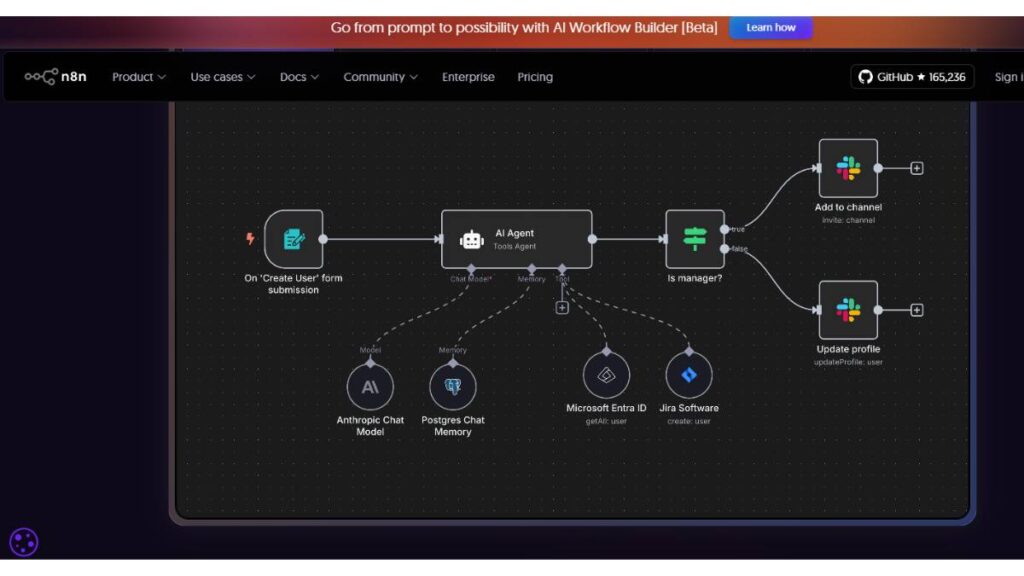
n8n stands out because it doesn’t try to oversimplify reality. Marketing workflows are rarely linear, and this tool respects that. It allows teams to design complex automation flows visually while still keeping logic transparent. Lead routing, CRM updates, content triggers, internal alerts; everything can be connected without losing visibility into what’s happening and why. It’s especially useful for teams that want control without chaos.
2. Zapier with AI Integrations: No-Code App Connectivity for Marketing
Zapier is often the first no-code tool teams touch, and for good reason. It connects almost everything to everything else. With AI layered in, those connections become smarter. Campaign actions can respond to intent signals, not just form submissions. It’s not built for deep customization, but for speed and reliability; it still does a lot of heavy lifting behind the scenes.
3. Make (Integromat): Visual Scenario Builder & Automated Campaign Flows
Make is where visual thinking really pays off. Scenarios are mapped out in a way that mirrors how marketers think about journeys. One action leads to another, with conditions in between. It’s particularly effective for campaign orchestration across channels, where timing and sequencing matter more than raw volume.
4. Levity AI: Intelligent Task Automation via No-Code AI
Levity is designed for repetitive decisions that usually drain time. Things like sorting inbound requests, tagging leads, or routing messages. Once trained, it quietly handles those decisions in the background. It doesn’t try to be everything. It just removes friction from everyday operations, which is often where teams lose the most energy.
5. Akkio: Predictive AI & Analytics for Marketing KPIs
Akkio is built for marketers who want answers, not dashboards. It focuses on forecasting and prediction without forcing users into complex data modeling. Campaign performance, churn risk, and lead quality become easier to evaluate early, while there’s still time to act. It’s less about reporting and more about direction.
6. DataRobot: Enterprise-Grade No-Code Predictive Models
For larger teams dealing with serious data volume, DataRobot offers depth. It’s designed for scale and governance, which matters when marketing decisions affect revenue at a high level. While it’s more structured than lighter tools, it allows non-technical teams to work with advanced predictive models without handing everything off to data science teams.
7. Obviously AI: No-Code Churn & Forecasting Model Builder
Obviously, AI keeps things straightforward. Upload data, ask questions, get predictions. It’s especially useful for teams that want to experiment with forecasting without committing to long setup cycles. The interface encourages exploration, which makes it easier to spot patterns that traditional reports often miss.
8. Miniflow.ai: Multi-Modal Content & Data Automations
Miniflow.ai blends content generation with workflow logic. It’s useful when marketing teams need to move between text, visuals, and data without switching tools constantly. Campaign assets, summaries, and internal documentation can all be connected in one place, which helps keep execution consistent.
9. Invideo: AI Video Generation Without Coding
Video is no longer optional, but it’s still resource-heavy. InVideo removes much of that friction. It allows teams to turn scripts, ideas, or existing content into videos quickly. While it won’t replace high-end production, it’s more than enough for ads, explainers, and social content that needs to move fast.
10. Revoicer: Emotion-Driven AI Voiceovers
Revoicer focuses on voice, which is often overlooked in marketing stacks. It’s useful for videos, demos, and audio content where tone matters. Instead of flat, generic narration, teams can create voiceovers that feel more intentional, without hiring external talent for every iteration.
11. Sim AI: Visual AI Agent Builder for Marketing Bots
Sim AI allows marketers to design conversational agents visually. These agents can handle lead qualification, support queries, or internal workflows. The strength here is flexibility. Conversations don’t feel rigid, and flows can be adjusted easily as campaigns evolve.
12. Google Teachable Machine: Create AI Models for Visual Content
This tool is simple by design. It allows teams to train basic visual or audio models without technical setup. For marketers working with visual recognition or interactive content, it opens up experimentation without needing deep expertise.
13. Lobe AI: AI Image Classification for Visual Campaigns
Lobe AI focuses on image classification in a way that’s accessible. It’s particularly useful for teams dealing with large volumes of visual assets. Sorting, tagging, and organizing content becomes less manual, which helps keep libraries usable instead of overwhelming.
14. CallFluent AI: Voice-Driven Customer Engagement Agents
CallFluent brings automation into voice interactions. It’s built for teams that rely on calls for lead follow-up or customer engagement. The goal isn’t to replace humans entirely, but to handle first-level interactions efficiently so teams can focus on conversations that actually need attention.
15. Claude AI Artifacts: Build AI Apps via Conversation

Claude’s artifact-based approach allows teams to create small applications and tools through structured interaction. For marketers, this means internal utilities, content helpers, or data tools can be built quickly without formal development cycles.
16. Custom AI Chatbots via n8n Agents: Lead Qualification & 24/7 Support
Using n8n agents, teams can build custom chatbots that integrate deeply with existing systems. These aren’t generic widgets. They pull context, update records, and route conversations intelligently. The result is support and lead handling that feels connected, not siloed.
17. Nanonets: Document AI & Text Extraction
Nanonets is built for handling documents at scale. Invoices, forms, contracts, and PDFs can be processed without manual review. For marketing teams working with partnerships, vendors, or offline data, this removes a surprising amount of hidden work.
18. PredictNow.ai: AI Forecasting for Financial Campaigns
PredictNow.ai focuses on forecasting outcomes tied to spend and performance. It’s useful when budget decisions need more than historical averages. Scenarios can be explored before money is committed, which helps reduce risk in aggressive growth phases.
19. BuildFire AI: AI Mobile App Builder for Customer Engagement
BuildFire allows teams to create mobile apps without starting from scratch. For brands focused on retention and engagement, this opens up direct channels that don’t rely entirely on third-party platforms. Updates and experiments can happen quickly, without long release cycles.
20. WeWeb: No-Code Web Apps With AI Features
WeWeb is designed for building web applications that go beyond static pages. It’s useful for interactive tools, dashboards, or customer-facing experiences where logic and personalization matter. Marketers can prototype and deploy without waiting for full development teams.
21. Emergent: Full Stack AI App Development With No Code
Emergent aims to cover the full journey, from idea to deployment. It’s ambitious, but for teams that want to build more complex internal or external tools, it provides structure without forcing technical depth.
22. Anything AI App Builder: Quick AI Tool Deployment
This platform is built for speed. Simple tools, fast setup, minimal friction. It’s useful when teams want to test ideas quickly or deploy small utilities without long planning cycles.
23. Miniflow.ai Creative Suite: Expanded Creative AI Capabilities
Beyond automation, Miniflow’s creative suite supports broader content needs. From ideation to repurposing, it helps teams keep creative output flowing without constantly switching contexts.
24. RAGFlow: Retrieval-Augmented AI Assistant Without Coding
RAGFlow focuses on knowledge retrieval. Teams can build assistants that pull from internal documents, FAQs, or campaign data. This is particularly useful for enablement, support, and internal knowledge sharing.

Apply Now for: AI Marketing Course
25. Sim AI: Cross-Channel Marketing Assistants
Sim AI also extends into cross-channel coordination. Assistants can help manage campaigns across platforms, keeping messaging aligned while adapting to channel-specific behavior. It’s less about automation for its own sake and more about coherence at scale.
Taken together, these tools show where marketing is heading. Less manual effort. Fewer bottlenecks. More room for strategy and judgment. The value isn’t in using all of them. It’s in choosing the right mix and letting systems handle what humans shouldn’t have to manage every day.
Case Studies: How Marketers Use No-Code AI Tools
Case studies sound formal, but what’s really useful is noticing the patterns that keep repeating across teams. The tools change. The goals don’t. Most marketers aren’t chasing novelty. They’re trying to remove friction where work keeps slowing down.
1. Automating Entire Marketing Funnels With n8n & Zapier
Funnels usually don’t break in dramatic ways. They leak. A lead comes in and sits too long. A follow-up goes out late. Data lands in the CRM, but no one notices. When teams connect their tools properly, those small delays disappear.
Automation here isn’t about doing more. It’s about doing things on time, every time. Leads move while intent is fresh. Handoffs feel cleaner. And once the workflow is visible, problems stop hiding. You can see where things stall. That alone changes how teams think about performance.
2. Predictive Customer Segmentation With Akkio
Most segmentation rules age badly. What looked smart six months ago quietly stops working. Predictive segmentation works differently. Instead of grouping people by who they were, it groups them by what they’re likely to do next.
That shift matters. Campaigns become proactive instead of reactive. High-risk users get attention early. High-value segments are treated with more care, not more noise. It’s not perfect, but it’s closer to how real behavior unfolds. And that’s usually good enough to move the needle.
3. AI-Driven Creative Campaigns Using InVideo & Revoicer
Creative work breaks when everything has to be perfect before it ships. Teams wait. Ideas pile up. Deadlines creep closer. Video and voice tools change that rhythm.
Drafts go out faster. Variations are tested instead of debated. Some ideas fail quickly, which is fine. The wins stand out sooner. Over time, creative stops feeling like a bottleneck and starts feeling like a system that learns. That’s a subtle shift, but a powerful one.
4. Chatbot Lead Qualification Without Developers
Lead qualification is rarely the best use of human time. It’s repetitive, inconsistent, and easy to get wrong on busy days. Chatbots handle the early back-and-forth without rushing or forgetting steps.
Good ones don’t feel intrusive. They ask just enough, then step aside. Sales teams receive a cleaner context. Marketing gets clearer feedback. And customers get responses when they expect them, not hours later. That timing matters more than most dashboards show.
Best Practices for Choosing AI No-Code Tools
Choosing tools is rarely a rational process. Demos look great. The features sound impressive. Then the real work starts. The gap shows up fast.
1. Tool Selection Checklist for Marketing Teams
The first question is boring but essential: Does this fit into what already exists? If integrations are fragile or require workarounds, frustration follows. Ease of use isn’t about simplicity. It’s about confidence. Can someone on the team adjust a workflow without worrying about breaking something?
Data handling deserves attention, too. Not in abstract terms. In practical ones. Who has access? What gets stored. What happens when something needs to be removed? Clear answers here prevent headaches later.
2. Comparing Pricing, Scale & Support
Pricing pages rarely tell the full story. Costs often rise with usage, not time. That’s fine, as long as it’s expected. Surprises tend to sour adoption.
Support quality matters more than feature depth once things go live. When something fails mid-campaign, fast help beats fancy options. Teams that value support early usually scale more smoothly.
3. Future-Proofing Your Marketing Stack
Stacks grow organically. That’s normal. What causes trouble is rigidity. Tools that lock teams into one way of working become liabilities when priorities shift.
Flexibility doesn’t mean complexity. It means room to adapt. The ability to tweak workflows, swap connections, or expand use cases without starting over. That’s what keeps a stack useful beyond the first few wins.
FAQs About AI No-Code Tools
1. What Is the Best No-Code AI Tool for Marketing?
There isn’t a universal answer, and that’s not a dodge. The best tool is usually the one that removes the most friction from a specific task. Automation tools shine in operations. Predictive tools help with planning. Creative tools support volume. Trying to find one tool to do everything often creates more problems than it solves.
2. Are No-Code AI Tools Secure for Business Data?
Some are, some aren’t. Security depends on the platform and how it’s used. Clear permissions, sensible access controls, and basic governance go a long way. No-code tools still need owners. When that’s in place, risks stay manageable.
3. How Do No-Code AI Tools Rank in Google’s AI Mode?
What tends to surface is content and platforms that explain things clearly and completely. Vague promises don’t travel far. Specific use cases, practical outcomes, and honest limitations carry more weight.
4. Can Marketers Use Multiple No-Code AI Tools Together?
Most teams already do. The trick is intent. Each tool should have a job. Overlap creates confusion. Clear roles create momentum. When tools complement rather than compete, the whole system feels lighter and easier to manage.